Corporate Business Flyer: A Designer's Toolkit for Polished Marketing
You know the feeling. You're staring at a blank artboard, trying to assemble a flyer for a client's product launch or your own side project. The text is written, the core idea is there, but the layout feels… generic. It lacks that specific, professional spark that makes someone stop scrolling and actually read. This is where a well-constructed template changes the game, moving you from a blank slate to a refined starting point. The Corporate Business Flyer template is built for that exact moment, designed to give you a professional, editable foundation that respects both your time and your creative vision.
Beyond a Simple Layout: Understanding the Template's Design DNA
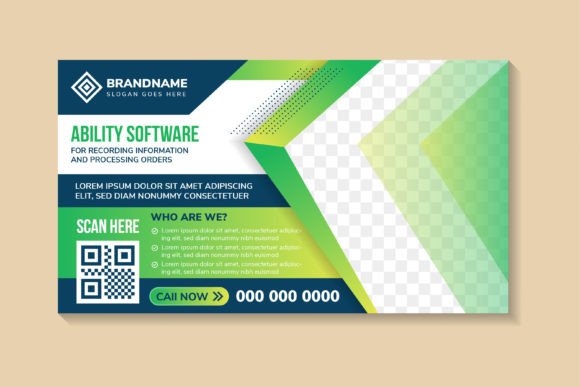
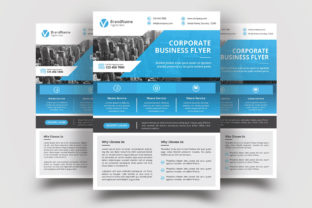
At first glance, this might look like just another flyer template. But its real value is in its construction. The Corporate Business Flyer isn't a static image; it's a fully editable file built with the designer's workflow in mind. The visual style leans into modern typography and clean, structured layouts. It balances white space with strong typographic hierarchy, creating a personality that's authoritative yet approachable. This isn't a wild, decorative script font or a playful handwritten font; it's a toolkit for clear, confident communication. The overall appeal is one of organized professionalism—it looks like it was made by a designer who understands how to guide a reader's eye efficiently.
The technical specifications are where this template demonstrates its serious intent. Delivered at 300 DPI Resolution in CMYK Color, it's genuinely Print Ready. You won't be caught out by a client asking for a print run only to discover your file is in RGB or has no bleed. The 0.25 in Bleed is already set, and the Size A4 8.27 in x 11.69 in dimensions are standard for international print projects. This attention to technical detail is the bedrock of a reliable design asset.
Where This Flyer Template Fits Into Your Creative Workflow
So, where does a template like this actually shine? Its strength lies in its versatility for professional and commercial communication. Think of it as a starting point for:
- Marketing and Sales Collateral: Perfect for product one-sheets, service overviews, event announcements, or corporate capability brochures. The structured layout can handle multiple sections of text and imagery without feeling cluttered.
- Internal Communications: Use it for professional-looking internal memos, project proposals, or quarterly reports that need to impress stakeholders.
- Publisher and Blogger Needs: Create downloadable lead magnets, media kits, or promotional materials for new courses or content series. Its clean style ensures text remains highly readable, which is crucial for editorial design.
- Small Business Branding: For entrepreneurs and small business owners, it provides a way to create consistent, branded materials for menus, price lists, or promotional handouts without starting from scratch each time.
While it's built for print, the core layout principles translate well to digital formats. You could adapt the design for a long-form social media graphic or a website banner, maintaining a cohesive brand identity across channels.
Making It Your Own: Practical Customization Guidance
The promise of "Easy Customizable and Editable" is only as good as the files you receive. Here, the inclusion of Ai CC, Ai CS, and EPS 10 files covers a wide range of Adobe Illustrator versions, which is considerate. The Help Files with links to the Free Fonts Used are critical; they ensure you can replicate the intended typographic look immediately. This is a huge time-saver compared to templates that leave you hunting for a mysterious typeface.
When you open the file, your real work begins. The template is a skeleton. Your job is to give it the muscle and skin of your specific brand. Here’s a practical approach:
- Evaluate the Fit: Before you change a single color, ask if the template's overall mood aligns with your message. The Corporate Business Flyer template is designed for clarity and professionalism. If you're promoting a minimalist tech startup or a financial consulting firm, it's a strong match. For a vintage record store or a children's party planner, you might need to heavily modify it or look elsewhere.
- Master the Font Pairing: The included fonts are a suggestion. A key design skill is knowing how to swap them. You might keep the suggested sans serif font for headings for its modern feel but pair it with a more traditional serif font for body text to enhance readability and add a touch of classic authority. Always test your new pairing at the actual print size to check for legibility.
- Interrogate the Hierarchy: Look at how the template guides the eye. The largest text should be for your primary message, the next size for supporting points, and so on. Maintain this logic. If you make everything big and bold to "get attention," you'll create visual noise and achieve the opposite effect. A strong visual hierarchy is what makes a flyer functional.
- Color with Purpose: The CMYK Color mode is for print, but that doesn't mean you're stuck with the default palette. Swap the colors to match your brand guidelines. Ensure there's enough contrast between text and background for easy reading, especially for longer paragraphs.
A Final Note on Assets and Licensing
It's important to note the disclaimer: images & mockup are not included. The template provides the layout and typographic structure. You must supply your own high-resolution photography or illustrations. This is standard practice and keeps the file size manageable. Furthermore, while the fonts are free, always double-check their individual licenses if you plan to use them in a commercial product beyond this specific flyer. The template itself is a commercial font and asset package, so review the license for your intended use case, especially for wide distribution.
Ultimately, a template like the Corporate Business Flyer is a professional accelerator. It doesn't do the creative thinking for you, but it eliminates the tedious groundwork of setting up a print-ready file from zero. By understanding its design intent and methodically customizing it, you can produce polished, effective marketing materials that look like they came from a dedicated design studio. That’s the real value: turning a common business need into a showcase of your own professional standards.